波浪效果

class SineWaveWidget extends StatefulWidget {
  final double amplitude; // 振幅(波浪的高度)
  final double frequency; // 频率(波浪的密集程度)
  final Color color; // 波浪颜色
  final Duration duration; // 流动一圈的周期

  const SineWaveWidget({
    super.key,
    this.amplitude = 20.0,
    this.frequency = 2.0,
    this.color = Colors.blueAccent,
    this.duration = const Duration(seconds: 1),
  });

  @override
  State<SineWaveWidget> createState() => _SineWaveWidgetState();
}

class _SineWaveWidgetState extends State<SineWaveWidget>
    with SingleTickerProviderStateMixin {
  late AnimationController _controller;

  bool _isForward = true;

  @override
  void initState() {
    super.initState();
    // 创建一个无限循环的动画控制器,用于驱动波浪的相位变化
    _controller = AnimationController(
      vsync: this,
      duration: widget.duration,
      lowerBound: 0.0,
      upperBound: 2 * pi,
    )..repeat(); // 自动无限循环
  }

  @override
  void dispose() {
    _controller.dispose();
    super.dispose();
  }

  @override
  Widget build(BuildContext context) {
    return GestureDetector(
      onTap: () {
        _isForward = !_isForward;
      },
      child: AnimatedBuilder(
        animation: _controller /*.drive(Tween(begin: 0, end: 2 * pi))*/,
        // 将 0~1 的进度映射为 0~2π 的相位
        builder: (context, child) {
          return CustomPaint(
            size: Size.infinite, // 填满父容器
            painter: SineWavePainter(
              amplitude: widget.amplitude,
              frequency: widget.frequency,
              color: widget.color,
              phase: _controller.value * (_isForward ? 1 : -1),
            ),
          );
        },
      ),
    );
  }
}

class SineWavePainter extends CustomPainter {
  final double amplitude;
  final double frequency;
  final Color color;
  final double phase;

  SineWavePainter({
    required this.amplitude,
    required this.frequency,
    required this.color,
    required this.phase,
  });

  @override
  void paint(Canvas canvas, Size size) {
    // final paint = Paint()
    //   ..color = color
    //   ..style = PaintingStyle.fill
    //   ..blendMode = BlendMode.xor;
    //
    // final path = Path();
    //
    // // 将波浪的基准线设置在垂直中心
    // final centerY = size.height / 2;
    //
    // // 1. 起点:从左下角开始
    // path.moveTo(0, size.height);
    //
    // // 2. 绘制正弦曲线
    // // 遍历画布的每一个像素宽度
    // for (double x = 0; x <= size.width; x++) {
    //   // 核心公式:y = A * sin(ω * x + φ)
    //   // 乘以 2π 是为了让 frequency 代表“画布宽度内包含的完整波浪数量”
    //   final y = centerY +
    //       amplitude * sin((x / size.width) * frequency * 2 * pi + phase);
    //   path.lineTo(x, y);
    // }
    //
    // // 3. 闭合路径:连接到右下角,再回到左下角,形成封闭的填充区域
    // path.lineTo(size.width, size.height);
    // path.close();
    //
    // final path2 = Path();
    // path2.moveTo(0, size.height);
    // for (double x = 0; x <= size.width; x++) {
    //   final y = centerY +
    //       amplitude * sin((x / size.width) * frequency * 2 * pi + (phase + pi));
    //   path2.lineTo(x, y);
    // }
    // path2.lineTo(size.width, size.height);
    // path2.close();
    //
    // // 4. 绘制到画布上
    // canvas.drawPath(path, paint);
    // canvas.drawPath(path2, paint);

    final paint = Paint()
      ..color = color
      ..style = PaintingStyle.fill
      ..blendMode = BlendMode.multiply;

    final centerY = size.height / 2;
    final omega = frequency * 2 * pi / size.width;

    // 将波浪划分为固定的段数(例如 16 段),确保动画循环时首尾完美衔接
    final segments = (frequency * 4).toInt();
    final step = size.width / segments;

    for (int wave = 0; wave < 2; wave++) {
      final currentPhase = phase + (wave * pi);
      final path = Path();

      // 起点:左下角
      path.moveTo(0, size.height);

      // 遍历每个分段点
      for (int i = 0; i <= segments; i++) {
        final x = i * step;
        final y = centerY + amplitude * sin(omega * x + currentPhase);

        if (i == 0) {
          path.lineTo(x, y);
        } else {
          // 前一个点的坐标和 Y 值
          final prevX = (i - 1) * step;
          final prevY = centerY + amplitude * sin(omega * prevX + currentPhase);

          // 计算前一个点的切线斜率(导数)
          final prevSlope =
              amplitude * omega * cos(omega * prevX + currentPhase);

          // 计算控制点(基于前一点的切线推算)
          final controlX = prevX + step / 2;
          final controlY = prevY + (prevSlope * step) / 2;

          // 使用二次贝塞尔曲线连接
          path.quadraticBezierTo(controlX, controlY, x, y);
        }
      }

      // 严格闭合路径:确保右下角和左下角完美贴合
      path.lineTo(size.width, size.height);
      path.close();

      canvas.drawPath(path, paint);
    }
  }

  @override
  bool shouldRepaint(covariant SineWavePainter oldDelegate) {
    // 只要相位(phase)发生变化,就重绘(用于实现流动动画)
    return oldDelegate.phase != phase;
  }
}
QQ消息拖拽效果

class QqDragBubble extends StatefulWidget {
  final double initialRadius; // 初始圆半径
  final double maxDragDistance; // 最大拖拽断裂距离
  final Color color;

  const QqDragBubble({
    super.key,
    this.initialRadius = 15.0,
    this.maxDragDistance = 100.0,
    this.color = Colors.red,
  });

  @override
  State<QqDragBubble> createState() => _QqDragBubbleState();
}

class _QqDragBubbleState extends State<QqDragBubble>
    with SingleTickerProviderStateMixin {
  Offset _dragOffset = Offset.zero; // 手指拖拽位置
  bool _isDragging = false;
  bool _isBurst = false; // 是否已断裂

  late AnimationController _burstController;
  late Animation<double> _burstAnimation;

  @override
  void initState() {
    super.initState();
    _burstController = AnimationController(
      vsync: this,
      duration: const Duration(milliseconds: 200),
    );
    _burstAnimation = Tween<double>(begin: 1.0, end: 0.0).animate(
      CurvedAnimation(parent: _burstController, curve: Curves.easeOut),
    );
  }

  @override
  void dispose() {
    _burstController.dispose();
    super.dispose();
  }

  void _onPanUpdate(DragUpdateDetails details) {
    if (_isBurst) return;
    setState(() {
      _isDragging = true;
      _dragOffset += details.delta;
    });
  }

  void _onPanEnd(DragEndDetails details) {
    if (_isBurst) return;
    final distance = _dragOffset.distance;
    if (distance > widget.maxDragDistance) {
      // 超过临界值,触发断裂动画
      setState(() => _isBurst = true);
      _burstController.forward(from: 0.0);
    } else {
      // 未超过临界值,回弹
      setState(() {
        _isDragging = false;
        _dragOffset = Offset.zero;
      });
    }
  }

  @override
  Widget build(BuildContext context) {
    return GestureDetector(
      onPanUpdate: _onPanUpdate,
      onPanEnd: _onPanEnd,
      child: AnimatedBuilder(
        animation: _burstAnimation,
        builder: (context, child) {
          return CustomPaint(
            size: Size(300, 300), // 给足绘制空间
            painter: QqBubblePainter(
              color: widget.color,
              initialRadius: widget.initialRadius,
              dragOffset: _isDragging ? _dragOffset : Offset.zero,
              maxDragDistance: widget.maxDragDistance,
              burstScale: _isBurst ? _burstAnimation.value : 1.0,
              isDragging: _isDragging && !_isBurst,
            ),
          );
        },
      ),
    );
  }
}

class QqBubblePainter extends CustomPainter {
  final Color color;
  final double initialRadius;
  final Offset dragOffset;
  final double maxDragDistance;
  final double burstScale;
  final bool isDragging;

  QqBubblePainter({
    required this.color,
    required this.initialRadius,
    required this.dragOffset,
    required this.maxDragDistance,
    required this.burstScale,
    required this.isDragging,
  });

  @override
  void paint(Canvas canvas, Size size) {
    final paint = Paint()
      ..color = color
      ..style = PaintingStyle.fill;

    // 起点圆心(屏幕中心)
    final startCenter = Offset(size.width / 2, size.height / 2);
    // 拖拽圆(终点)圆心
    final endCenter = startCenter + dragOffset;

    // 计算两点间的距离和角度
    final distance = (endCenter - startCenter).distance;
    final angle =
        atan2(endCenter.dy - startCenter.dy, endCenter.dx - startCenter.dx);

    // 1. 动态计算半径:拖拽越远,起点圆越小;终点圆保持原大小
    double startRadius = initialRadius;
    double endRadius = initialRadius;
    if (isDragging && distance < maxDragDistance) {
      final ratio = distance / maxDragDistance;
      startRadius = initialRadius * (1 - ratio * 0.7); // 起点圆最多缩小 70%
    }

    // 2. 绘制起点圆(断裂后消失)
    if (!isDragging || distance <= maxDragDistance) {
      if (isDragging) {
        // 拖拽过程中起点圆随距离缩小
      } else {
        startRadius = initialRadius;
      }
      canvas.drawCircle(startCenter, startRadius, paint);
    }

    // 3. 绘制终点圆(拖拽时跟随手指,断裂时播放缩放消失动画)
    if (isDragging) {
      canvas.drawCircle(endCenter, endRadius, paint);
    } else if (burstScale < 1.0) {
      // 断裂爆炸动画
      canvas.drawCircle(endCenter, endRadius * burstScale, paint);
    } else {
      // 初始状态
      canvas.drawCircle(startCenter, initialRadius, paint);
    }

    // 4. 绘制贝塞尔连接带
    if (isDragging && distance < maxDragDistance && distance > 0) {
      final path = Path();

      // 计算连接点坐标(基于三角函数)
      // 起点圆上的两个切点
      final startX1 = startCenter.dx + startRadius * cos(angle + pi / 2);
      final startY1 = startCenter.dy + startRadius * sin(angle + pi / 2);
      final startX2 = startCenter.dx + startRadius * cos(angle - pi / 2);
      final startY2 = startCenter.dy + startRadius * sin(angle - pi / 2);

      // 终点圆上的两个切点
      final endX1 = endCenter.dx + endRadius * cos(angle + pi / 2);
      final endY1 = endCenter.dy + endRadius * sin(angle + pi / 2);
      final endX2 = endCenter.dx + endRadius * cos(angle - pi / 2);
      final endY2 = endCenter.dy + endRadius * sin(angle - pi / 2);

      // 贝塞尔控制点(取两点连线的中点)
      final controlX = (startCenter.dx + endCenter.dx) / 2;
      final controlY = (startCenter.dy + endCenter.dy) / 2;

      // 绘制上半部分曲线
      path.moveTo(startX1, startY1);
      path.quadraticBezierTo(controlX, controlY, endX1, endY1);

      // 绘制下半部分曲线(闭合路径)
      path.lineTo(endX2, endY2);
      path.quadraticBezierTo(controlX, controlY, startX2, startY2);

      path.close();
      canvas.drawPath(path, paint);
    }
  }

  @override
  bool shouldRepaint(covariant QqBubblePainter oldDelegate) {
    return oldDelegate.dragOffset != dragOffset ||
        oldDelegate.isDragging != isDragging ||
        oldDelegate.burstScale != burstScale;
  }
}
手写板带播放效果
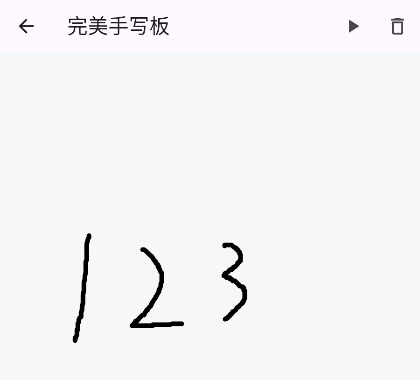
import 'package:flutter/material.dart';

// 1. 笔画数据模型(包含时间戳)
class Stroke {
  final List<Offset> points;
  final DateTime startTime;
  final DateTime endTime;
  final Color color;
  final double strokeWidth;

  Stroke({
    required this.points,
    required this.startTime,
    required this.endTime,
    this.color = Colors.black,
    this.strokeWidth = 5.0,
  });

  int get duration => endTime.difference(startTime).inMilliseconds;
}

class HandwritingCanvas extends StatefulWidget {
  const HandwritingCanvas({super.key});

  @override
  State<HandwritingCanvas> createState() => _HandwritingCanvasState();
}

class _HandwritingCanvasState extends State<HandwritingCanvas>
    with SingleTickerProviderStateMixin {
  // 历史笔画
  final List<Stroke> _strokes = [];

  // 正在绘制的笔画(使用 ValueNotifier 保证书写绝对流畅)
  final ValueNotifier<List<Offset>> _currentPointsNotifier = ValueNotifier([]);
  DateTime? _strokeStartTime;

  // 播放控制
  late AnimationController _playbackController;
  late Animation<double> _playbackAnimation;
  bool _isPlaying = false;

  @override
  void initState() {
    super.initState();
    _playbackController = AnimationController(
      vsync: this,
      duration: const Duration(seconds: 5),
    );
    _playbackAnimation = Tween<double>(begin: 0.0, end: 1.0).animate(
      CurvedAnimation(parent: _playbackController, curve: Curves.linear),
    );
    // 监听播放动画,触发画笔重绘
    _playbackAnimation.addListener(() {
      if (_isPlaying) setState(() {});
    });
  }

  @override
  void dispose() {
    _playbackController.dispose();
    _currentPointsNotifier.dispose();
    super.dispose();
  }

  // --- 录制逻辑 ---
  void _onPanStart(DragStartDetails details) {
    if (_isPlaying) return; // 播放时禁止书写
    _strokeStartTime = DateTime.now();
    _currentPointsNotifier.value = [details.localPosition];
  }

  void _onPanUpdate(DragUpdateDetails details) {
    if (_isPlaying) return;
    _currentPointsNotifier.value = [
      ..._currentPointsNotifier.value,
      details.localPosition
    ];
  }

  void _onPanEnd(DragEndDetails details) {
    if (_isPlaying) return;
    if (_currentPointsNotifier.value.isNotEmpty && _strokeStartTime != null) {
      setState(() {
        _strokes.add(Stroke(
          points: List.from(_currentPointsNotifier.value),
          startTime: _strokeStartTime!,
          endTime: DateTime.now(),
        ));
        _currentPointsNotifier.value = [];
      });
    }
  }

  // --- 播放逻辑 ---
  void _startPlayback() {
    if (_strokes.isEmpty || _isPlaying) return;
    setState(() => _isPlaying = true);

    final totalDuration =
        _strokes.last.endTime.difference(_strokes.first.startTime);
    _playbackController.duration = totalDuration;
    _playbackController.forward(from: 0.0).then((_) {
      setState(() => _isPlaying = false);
    });
  }

  // --- 清除逻辑 ---
  void _clearCanvas() {
    if (_isPlaying) return;
    setState(() {
      _strokes.clear();
      _currentPointsNotifier.value = [];
    });
  }

  @override
  Widget build(BuildContext context) {
    return Scaffold(
      appBar: AppBar(
        title: const Text('完美手写板'),
        actions: [
          IconButton(
            icon: const Icon(Icons.play_arrow),
            onPressed: _isPlaying ? null : _startPlayback,
            tooltip: '播放笔迹',
          ),
          IconButton(
            icon: const Icon(Icons.delete_outline),
            onPressed: _isPlaying ? null : _clearCanvas,
            tooltip: '清除画板',
          ),
        ],
      ),
      body: GestureDetector(
        onPanStart: _onPanStart,
        onPanUpdate: _onPanUpdate,
        onPanEnd: _onPanEnd,
        child: RepaintBoundary(
          child: CustomPaint(
            size: Size.infinite,
            painter: HandwritingPainter(
              strokes: _strokes,
              currentPoints: _currentPointsNotifier,
              isPlaying: _isPlaying,
              playbackProgress: _playbackAnimation.value,
              totalDurationMs: _strokes.isNotEmpty
                  ? _strokes.last.endTime
                      .difference(_strokes.first.startTime)
                      .inMilliseconds
                  : 0,
            ),
          ),
        ),
      ),
    );
  }
}

class HandwritingPainter extends CustomPainter {
  final List<Stroke> strokes;
  final ValueNotifier<List<Offset>> currentPoints;
  final bool isPlaying;
  final double playbackProgress;
  final int totalDurationMs;

  HandwritingPainter({
    required this.strokes,
    required this.currentPoints,
    required this.isPlaying,
    required this.playbackProgress,
    required this.totalDurationMs,
  }) : super(repaint: currentPoints); // 依然保留 ValueNotifier 驱动书写

  @override
  void paint(Canvas canvas, Size size) {
    if (isPlaying) {
      // ================= 播放模式 =================
      final currentTimeMs = (playbackProgress * totalDurationMs).toInt();
      for (final stroke in strokes) {
        final elapsed = currentTimeMs -
            stroke.startTime.difference(strokes.first.startTime).inMilliseconds;
        if (elapsed <= 0) continue; // 还没到开始时间

        final paint = Paint()
          ..color = stroke.color
          ..strokeWidth = stroke.strokeWidth
          ..strokeCap = StrokeCap.round
          ..strokeJoin = StrokeJoin.round
          ..style = PaintingStyle.stroke;

        final path = Path();
        path.moveTo(stroke.points.first.dx, stroke.points.first.dy);
        for (int i = 1; i < stroke.points.length; i++) {
          path.lineTo(stroke.points[i].dx, stroke.points[i].dy);
        }

        if (elapsed < stroke.duration) {
          // 正在播放中的笔画:按比例截取
          final progress = elapsed / stroke.duration;
          final metric = path.computeMetrics().first;
          canvas.drawPath(
              metric.extractPath(0, metric.length * progress), paint);
        } else {
          // 已经播放完的笔画:完整绘制
          canvas.drawPath(path, paint);
        }
      }
    } else {
      // ================= 书写模式 =================
      // 绘制历史笔画
      for (final stroke in strokes) {
        final paint = Paint()
          ..color = stroke.color
          ..strokeWidth = stroke.strokeWidth
          ..strokeCap = StrokeCap.round
          ..strokeJoin = StrokeJoin.round
          ..style = PaintingStyle.stroke;

        final path = Path();
        path.moveTo(stroke.points.first.dx, stroke.points.first.dy);
        for (int i = 1; i < stroke.points.length; i++) {
          path.lineTo(stroke.points[i].dx, stroke.points[i].dy);
        }
        canvas.drawPath(path, paint);
      }

      // 绘制正在写的笔画(通过 ValueNotifier 局部重绘,绝对流畅)
      final points = currentPoints.value;
      if (points.isNotEmpty) {
        final paint = Paint()
          ..color = Colors.black
          ..strokeWidth = 5.0
          ..strokeCap = StrokeCap.round
          ..strokeJoin = StrokeJoin.round
          ..style = PaintingStyle.stroke;

        final path = Path();
        path.moveTo(points.first.dx, points.first.dy);
        for (int i = 1; i < points.length; i++) {
          path.lineTo(points[i].dx, points[i].dy);
        }
        canvas.drawPath(path, paint);
      }
    }
  }

  @override
  bool shouldRepaint(covariant HandwritingPainter oldDelegate) {
    // 播放时或者历史笔画变化时重绘
    return isPlaying || oldDelegate.strokes != strokes;
  }
}
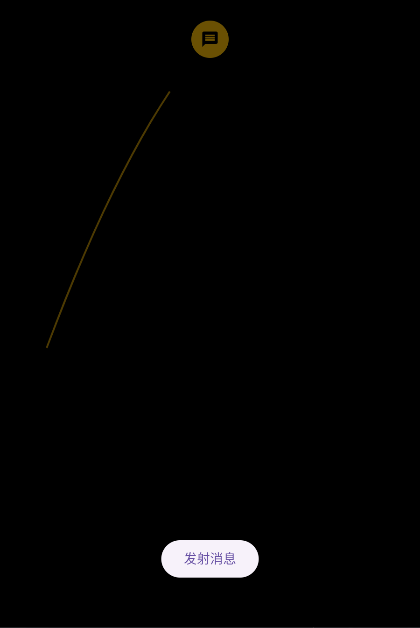
抛物线动画效果


评论 (0)