

搜索到
96
篇与
的结果
-
groovy调用node执行js 目前好像没有更好的方案去实现在node环境下执行js,这种方案需要配合js代码,目标js只能为这个groovy服务groovy代码// Groovy script to execute Node.js script static def runJsScript(String scriptPath, String argument) { // Create a command def command = ["node", scriptPath, argument] // Create a ProcessBuilder with the command def processBuilder = new ProcessBuilder(command) // Start the process def process = processBuilder.start() // Capture the output of the process def output = new StringWriter() def error = new StringWriter() process.consumeProcessOutput(output, error) // Wait for the process to complete process.waitFor() // Return the output and error streams return [output.toString().trim(), error.toString().trim()] } // Path to the JavaScript file def scriptPath = "./a.js" // Argument to pass to the JavaScript function def argument = "World" // Call the JavaScript function def (output, error) = runJsScript(scriptPath, argument) if (error) { println "Error: $error" } else { println "Output: $output" } js代码function greet(name) { return `Hello, ${name}!`; } console.log(greet(process.argv[2]));需要传参多少个参数,需要在js块拼接 process.argv[2] process.argv[3]执行多个参数groovystatic def runJsScript(String scriptPath, String... arguments) { def command = ["node", scriptPath] arguments.each {command.add(it)} def processBuilder = new ProcessBuilder(command) def process = processBuilder.start() def output = new StringWriter() def error = new StringWriter() process.consumeProcessOutput(output, error) process.waitFor() return [output.toString().trim(), error.toString().trim()] }jsfunction greet(name,value) { return `Hello, ${name}: ${value}`; } console.log(greet(process.argv[2],process.argv[3]));{dotted startColor="#ff6c6c" endColor="#1989fa"/}其实还是有个小坑 传参json会被解析成js对象,就导致js拿到的数据已经是处理过的了,后面的流程是会受影响的。 解决方案:可以在添加额外参数时进行检验,判断当前字符串是否可以被转换为json对象,如果可以就做转义处理,str.replace('"','\"') 可以封装成一个工具类使用 class Execute { static def js(String scriptPath, String... arguments) { def command = ["node", scriptPath] // 如果是json格式,就进行转义,防止传参过程中被解析 arguments.each { if (isValidJson(it)) { command.add(it.replace('"','\\""')) }else command.add(it) } def processBuilder = new ProcessBuilder(command) def process = processBuilder.start() def output = new StringWriter() def error = new StringWriter() process.consumeProcessOutput(output, error) process.waitFor() if (error!=null && (error as String) != ""){ throw new Exception("js脚本出错:+$error") } return output.toString().trim() } // 判断字符串是不是json格式 static private boolean isValidJson(String str) { def s = new JsonSlurper() try { s.parseText(str) return true } catch (Exception e) { return false } } }
-
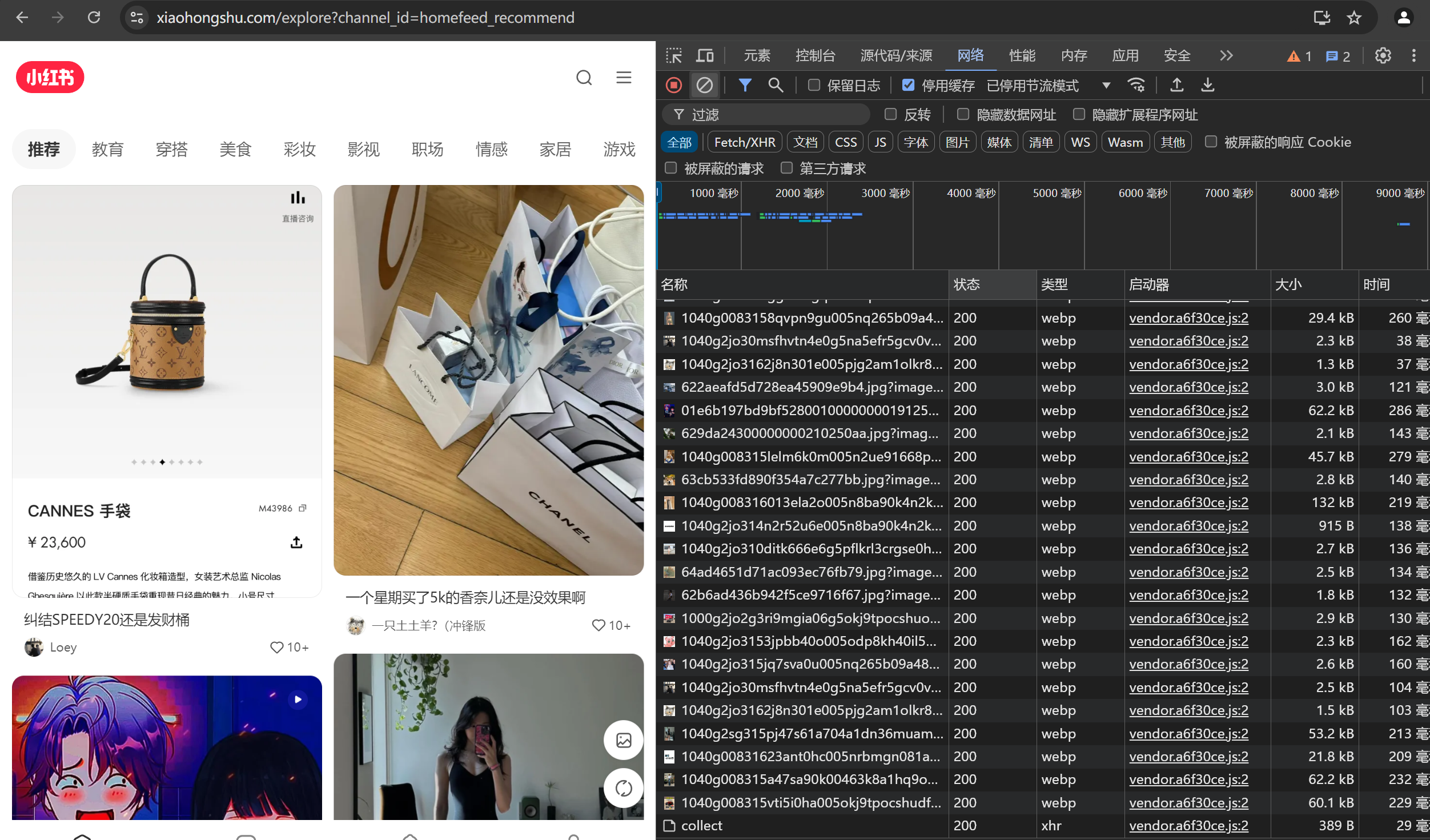
 js逆向xhs 首先需要先确定目标接口打开开发者工具选择网络网络请求比较多,不太好定位,先Ctrl+L清空一下网络日志随便点击一个标签,从上往下看可以看到 hoomfeed 的响应是有我们要的数据可以多刷新几次,看一下请求头里面的参数哪些是固定的然后右键复制,以curl bash格式到这个网站生成一下请求代码测试一下能不能跑通https://curlconverter.com/我使用的okhttp不过有一点需要注意,请求体的json字符串不能带有空格,还是要注意一下,一般还是要看下负载源代码给格式,保持一致就没问题了 OkHttpClient client = new OkHttpClient(); String jsonBody = "{\"cursor_score\":\"\",\"num\":18,\"refresh_type\":1,\"note_index\":32,\"unread_begin_note_id\":\"\",\"unread_end_note_id\":\"\",\"unread_note_count\":0,\"category\":\"homefeed.fashion_v3\",\"search_key\":\"\",\"need_num\":8,\"image_formats\":[\"jpg\",\"webp\",\"avif\"],\"need_filter_image\":false}"; // 注意这里是json格式 RequestBody requestBody = RequestBody.create(jsonBody,MediaType.parse("application/json; charset=utf-8")) Request request = new Request.Builder() .url("https://edith.xiaohongshu.com/api/sns/web/v1/homefeed") .post(requestBody) .header("authority", "edith.xiaohongshu.com") .header("accept", "application/json, text/plain, */*") .header("accept-language", "zh-CN,zh;q=0.9,en;q=0.8,en-GB;q=0.7,en-US;q=0.6") .header("cache-control", "no-cache") .header("content-type", "application/json;charset=UTF-8") .header("cookie", "abRequestId=e3bdcd27-e1b5-5f53-89b5-7e2802d396e0; xsecappid=xhs-pc-web; a1=1913b4ae942vlubadspzq6n0dzv1sn1s16vme85li50000892240; webId=f51031180df1b91abeef5db1d71629e1; web_session=030037a184491809ffa8205bcf214a315d86ed; gid=yjyqD40iYWyfyjyqD40djKY24Jh17D0fMUuAh13KI8fuh628yMIyMd888YjJJ488KD82yj0y; webBuild=4.28.5; unread={%22ub%22:%2266986e9b0000000003027356%22%2C%22ue%22:%226699c440000000000d00fd0f%22%2C%22uc%22:23}; acw_tc=7c07ab06520fd63e04c63f0273004a3337c1cd30cc32b06c921ddff420388b1e; websectiga=3fff3a6f9f07284b62c0f2ebf91a3b10193175c06e4f71492b60e056edcdebb2; sec_poison_id=8ef6b86b-8ad1-4aa5-9ec4-e3309f2368b3" ) .header("origin", "https://www.xiaohongshu.com") .header("pragma", "no-cache") .header("referer", "https://www.xiaohongshu.com/") .header("sec-ch-ua", "\"Chromium\";v=\"122\", \"Not(A:Brand\";v=\"24\", \"Microsoft Edge\";v=\"122\"") .header("sec-ch-ua-mobile", "?0") .header("sec-ch-ua-platform", "\"Windows\"") .header("sec-fetch-dest", "empty") .header("sec-fetch-mode", "cors") .header("sec-fetch-site", "same-site") .header("user-agent", "Mozilla/5.0 (Windows NT 10.0; Win64; x64) AppleWebKit/537.36 (KHTML, like Gecko) Chrome/122.0.0.0 Safari/537.36 Edg/122.0.0.0") .header("x-b3-traceid", "1c3f0fbf2fac047b") .header("x-s", "XYW_eyJzaWduU3ZuIjoiNTMiLCJzaWduVHlwZSI6IngyIiwiYXBwSWQiOiJ4aHMtcGMtd2ViIiwic2lnblZlcnNpb24iOiIxIiwicGF5bG9hZCI6ImQ3ZTU0NWYyNTMzM2I2MWYxMjFlMmJmZGI4ZThhMGZkMDg2Mzg0NWY2ZTU3MzEyM2IzN2JmMjIyZDU5MGE4ZDg2NjQ3ODEyMzBkYWU5ODVjMjMzYzdiNDUxNjBkYmQ3NDdkZWY5ZDBmZDBhNWQ0YzAzMzE3OGRlNGYyYmQ3YTgyNGNkZTYxZDgzNDMxNmQ3OWQ1NTFjY2Q5YjJlYTEyZWM2YWNlMjM3ZjVjZjQzMDllZTg0OGU5NTQwZGEwY2NhN2IyZWJlNjMzODdhOGE3ZTAwNDM2Yzk2NmI5OWM4MWUzM2IxNDMyYjk0MDEyOGY3ZjcwMWU4Yjc2MTYyOTFiZDBmN2UxNDYxNWFhZjJiZDExMDBiYWRiNWM5NTFiZjc2N2M1ZWM5NDkxYWJiOTUzOGYwMzc5ZTY1YzgzOGQ1ZGVjODdkMjZlZmQzM2M5OGY0NGVlMjQzODlmNDE4YjUyNWY4ZmEyYzE0YjU4ZmZkOWZhMmYxZTcwMzhiNjQ1YTVlODhhOTBlYTRlYjRiZmM1NGJiMWIyODlkY2ExNDExYTk5In0=" ) .header("x-s-common", "2UQAPsHC+aIjqArjwjHjNsQhPsHCH0rjNsQhPaHCH0P1+UhhN/HjNsQhPjHCHS4kJfz647PjNsQhPUHCHdYiqUMIGUM78nHjNsQh+sHCH0c1P0W1+aHVHdWMH0ijP/DlP9HAPAG7PePhq/414ozIwB8VwgL7J74xJ/b7Jg8h4ebE+7WM2eGMPeZIPecl+0WFPsHVHdW9H0il+AHAP0qMP/PIweZINsQh+UHCHSY8pMRS2LkCGp4D4pLAndpQyfRk/Sz+yLleadkYp9zMpDYV4Mk/a/8QJf4EanS7ypSGcd4/pMbk/9St+BbH/gz0zFMF8eQnyLSk49S0Pfl1GflyJB+1/dmjP0zk/9SQ2rSk49S0zFGMGDqEybkea/8QJpp7/gknybkxpgkyyDDl/p4b2DRrpgSyzBTE/M4b2DRLyBkwzrrF/nkByDETpfMwzM83nDz02pSLy7Y82DDlnnksJrMoa/QwzMpE/dkiJbkLcgS82Dp7/dkVyrET/gSwzFShnnksJLEx8BT+pbrA/DzdPrMxagkwpB+E/nk8PbkLa/+w2SS7/Lz8+pSCyAmOzFEi/gkwybSCGA++zFFF/Lzz2bSCJBl+2flk/p4+2LMozgYyJpbhnDzb2SkTp/z+PSrFnfMtypkoLgSwPDM7/FzayDMCpfMwpMrF/nkbPDMxc/m+zb8TnSzp2Skg/g48PDDFnfM+2LMLa/++PDLA/FzaJrMLn/b+pFDU/nkByrMLpg4OzBz3ngk0PrEgpfS+ySb7/fMayrELLfTwzrEi/dkm+rRopgS8yf+h/0QBybSTL/zypFEk/nk8PrhUL/QwzrpCn/Qz2DRrLgY82SQx/fMayDRLc/mypBzTnDzm4MSL/fSyySLI/fM8+rhUpfT+zbrlnDzd+LEgaflyySpE/LzmPMDUpfYwJLFM/Lzz+LMrzgkw2D8ingkz2rECyBlyySk3/fk8+bSxL/++PSSC//QnyDhUz/zypb8knSzd2SSTLfT8yfqAnpz+PrMLcgk8prki//QnJpSgpfS+ySrInDz8+pkrGAp+yfVA/FznJbkT//++2SDFn/QyyMkTp/+wyDFF/LziyMSx87kypB+7/F4+2rExG7Y82f+hanhIOaHVHdWhH0ija/PhqDYD87+xJ7mdag8Sq9zn494QcUT6aLpPJLQy+nLApd4G/B4BprShLA+jqg4bqD8S8gYDPBp3Jf+m2DMBnnEl4BYQyrkSL98+zrTM4bQQPFTAnnRUpFYc4r4UGSGILeSg8DSkN9pgGA8SngbF2pbmqbmQPA4Sy9MaPpbPtApQy/8A8BE68p+fqpSHqg4VPdbF+LHIzBRQ2sTczFzkN7+n4BTQ2BzA2op7q0zl4BSQyopYaLLA8/+Pp0mQPM8LaLP78/mM4BIUcLzTqFl98Lz/a7+/LoqMaLp9q9Sn4rkOqgqhcdp78SmI8BpLzS4OagWFprSk4/8yLo4ULopF+LS9JBbPGf4AP7bF2rSh8gPlpd4HanTMJLS3agSSyf4AnaRgpB4S+9p/qgzSNFc7qFz0qBSI8nzSngQr4rSe+fprpdqUaLpwqM+l4Bl1Jb+M/fkn4rSh+nLlqgcAGfMm8p81wrlQzp+CanYb8aTmzDzQPFpcaFDhcDSkpA4yLo4+ag8oy0zA8g+8aLEA2b87LFSe+9pfw/8SPB8bwrSkcnL9p7Q/wob7pLSb+7Pl80mA+S4m8nSn4o4IyDRSpM874LS9ngm0Pe8S8bm7c7ZE+7+gpdqhagYQPDDAwBSAqg4y8M8FLokdwbb7GFESyfc68nSl49RQyrbALURmq9TBLSSQyURAPrM9q9TDz/mQyB4Ayp87zrSiz9zzqg4twopFwLDAP9LALoznanSwqM8n47YQzaRA8S8F/LEn4FkSqg4Bag8lzLShpjuUwgpfa9+d8gYM4e4QyBWhanDI8p+c49EUngkU/Bi7qM4AtM8QypmSqpmF/Mkc4F+Q40+SPMmF4aTr/fpn204ApD8L8LSi87PAJFRAypmFGgmM49bQ4f4SPop7yrSkN9pL8nSSagG68p+sN9p/qgzGagYNq7YM4MLF8pbFaLprtFS9+7+haLEA2rbdqAm0+7+DLo4kag8HpFS9aL80Lo4yaL+QLDSi87+n/ezV/fktq98l4ozQyoZUcdbFPLYQ87+/zepSPop7qBRc474Q4SkGanSc4B+c49blLo4ManSS8/mCq/FjNsQhwaHCN/DE+AcI+eH9PsIj2erIH0iU+dF=") .header("x-t", "1723275130800") .build(); try (Response response = client.newCall(request).execute()) { if (!response.isSuccessful()) throw new IOException("Unexpected code " + response); def res = response.body().string(); println res } 直接运行是没有问题的,然后就要看哪些参数是会影响请求的结果在请求头可以看到像 x-s x-s-common 等这一类的参数明显就是加密过的,而且一般情况也会作为必要参数,x-t很明显是个时间戳可以试一下将这几个参数注释掉运行,发现只有x-s的值不正确或者没有的情况下是拿不到请求结果的,现在也就明确了要找x-s的加密函数可以跟栈去找加密函数,找到在那两个函数或者文件内容由明文变成密文,或者直接搜索关键字勾选上正则匹配,只有7个匹配项可以一个个都看一下,不放心的话也可以都先打上断点,明显可以看到只有这里才有赋值语句,那就在这打上断点,看到调用了l(a && void 0 !== window._webmsxyw ? window._webmsxyw : encrypt_sign)(c, i) || {};三元表达式调用了window._webmsxyw函数,传参c,i在控制台调用这个函数现在加密函数已经差不多确定了进入到函数内部查看经过了大量混淆,这段代码想要扣下来还是比较麻烦的,基本上是没有一点可读性那就直接整个文件都拿下来,补环境,只要能跑通里面的window._webmsxyw就能拿到加密的值了新建一个包xhs,将复制下来的源代码粘贴到course.js文件中,为了更好的解耦,我们准备三个js文件,course存放源代码,env作为补环境的代码,xhs则写我们输入加密函数的代码跟逻辑然后在xhs文件里面引入require("./env")require("./sourse")注意一下要先引入环境,不然sourse会因为没有环境报错env使用代理看到哪些函数方法被调用了,却少什么补充什么就行了 function setProxy(proxyObjs) { for (let i = 0; i < proxyObjs.length; i++) { const handler = `{ get: function(target, property, receiver) { if (property!="Math" && property!="isNaN"){ if (target[property] && typeof target[property] !="string" && Object.keys(target[property]).length>3){ }else{ console.log("方法:", "get ", "对象:", "${proxyObjs[i]}", " 属性:", property, " 属性类型:", typeof property, ", 属性值:", target[property]);}} return target[property]; }, set: function(target, property, value, receiver) { console.log("方法:", "set ", "对象:", "${proxyObjs[i]}", " 属性:", property, " 属性类型:", typeof property, ", 属性值:", value, ", 属性值类型:", typeof target[property]); return Reflect.set(...arguments); } }`; eval(`try { ${proxyObjs[i]}; ${proxyObjs[i]} = new Proxy(${proxyObjs[i]}, ${handler}); } catch (e) { ${proxyObjs[i]} = {}; ${proxyObjs[i]} = new Proxy(${proxyObjs[i]}, ${handler}); }`); } } setProxy(['window', 'document', ' navigator', 'screen', 'localStorage', 'location']) 补环境的代码env.js// 补环境 window window = global delete global delete Buffer // document document = { createElement: function(x){ if (x === "canvas"){ return { getContext: function(){} } } }, documentElement:{}, cookie:'abRequestId=e3bdcd27-e1b5-5f53-89b5-7e2802d396e0; xsecappid=xhs-pc-web; webId=f51031180df1b91abeef5db1d71629e1; web_session=030037a184491809ffa8205bcf214a315d86ed; gid=yjyqD40iYWyfyjyqD40djKY24Jh17D0fMUuAh13KI8fuh628yMIyMd888YjJJ488KD82yj0y; webBuild=4.28.5; unread={%22ub%22:%2266986e9b0000000003027356%22%2C%22ue%22:%226699c440000000000d00fd0f%22%2C%22uc%22:23}; acw_tc=7c07ab06520fd63e04c63f0273004a3337c1cd30cc32b06c921ddff420388b1e; websectiga= sec_poison_id=8ef6b86b-8ad1-4aa5-9ec4-e3309f2368b3' } // localStorage localStorage = { getItem: function (){ // return '{"signVersion":"1"}' return '{"validate":true,"commonPatch":["/fe_api/burdock/v2/note/post","/api/sns/web/v1/comment/post","/api/sns/web/v1/note/like","/api/sns/web/v1/note/collect","/api/sns/web/v1/user/follow","/api/sns/web/v1/feed","/api/sns/web/v1/login/activate","/api/sns/web/v1/note/metrics_report","/api/redcaptcha","/api/store/jpd/main","/phoenix/api/strategy/getAppStrategy"],"signUrl":"https://fe-video-qc.xhscdn.com/fe-platform/bccb34c4f2976c51b565494c0a760c42d962b25b.js","signVersion":"1","url":"https://fe-video-qc.xhscdn.com/fe-platform/a1c872577b980b890b0850cef89371b35125649a.js","reportUrl":"/api/sec/v1/shield/webprofile","desVersion":"2"}' } } // navigator navigator = { appCodeName: "Mozilla", appName: "Netscape", appVersion: "5.0 (Windows NT 10.0; Win64; x64) AppleWebKit/537.36 (KHTML, like Gecko) Chrome/127.0.0.0 Safari/537.36", userAgent: 'Mozilla/5.0 (Windows NT 10.0; Win64; x64) AppleWebKit/537.36 (KHTML, like Gecko) Chrome/127.0.0.0 Safari/537.36' } xhs.jsrequire("./env") require("./sourse") const c = '/api/sns/web/v1/homefeed' const i = { "cursor_score": "", "num": 18, "refresh_type": 1, "note_index": 32, "unread_begin_note_id": "", "unread_end_note_id": "", "unread_note_count": 0, "category": "homefeed.fashion_v3", "search_key": "", "need_num": 8, "image_formats": [ "jpg", "webp", "avif" ], "need_filter_image": false } function getX(){ return window._webmsxyw(c,i) } console.log(getX()['X-s'])至此加密函数补环境就结束了{dotted startColor="#ff6c6c" endColor="#1989fa"/}不过还是有点小坑localStorage.getItem 直接返回一个空函数是会诱导生成错误的数据,我一开始就是返回的空函数,然后验证发现加密值是错的,因为使用了代理,可以看到最近的函数就是localStorage.getItem可以通过hook getItem函数拿到传参是多少localStorage.getItem_ = localStorage.getItem;localStorage.getItem = function(x){console.log(x);localStorage.getItem_(x);}再执行window._webmsxyw函数就能看到getItem传参有了参数,直接在控制台 localStorage.getItem("sdt_source_storage_key")拿到参数即可,现在就能正确拿到正确的加密值了
 -
浏览器window对象的常用属性和方法 1. window简介: window 是浏览器的全局对象。通过 window,可以访问所有全局变量、全局函数、文档对象模型 (DOM) 等。示例值:console.log(window === window.window); // true2. document简介: document 对象表示 HTML 或 XML 文档的根节点。它提供了对文档内容的访问和操作方法。常用属性和方法:document.title: 获取或设置文档的标题。console.log(document.title); // "Example Page" document.title = "New Title";document.getElementById(id): 根据 ID 获取元素。var element = document.getElementById("header"); console.log(element.innerHTML); // 输出该元素的 HTML 内容document.querySelector(selector): 返回匹配指定 CSS 选择器的第一个元素。var element = document.querySelector(".my-class"); console.log(element.innerHTML); // 输出该元素的 HTML 内容document.createElement(tagName): 创建一个指定标签类型的新元素。var newDiv = document.createElement("div"); newDiv.innerHTML = "Hello, World!"; document.body.appendChild(newDiv);document.addEventListener(event, function): 为文档添加事件监听器。document.addEventListener("DOMContentLoaded", function() { console.log("Document is fully loaded"); });3. location简介: location 对象包含当前页面的 URL 信息,并提供了操作 URL 的方法。常用属性和方法:location.href: 获取或设置当前页面的 URL。console.log(location.href); // "https://www.example.com/page.html" location.href = "https://www.example.com/newpage.html";location.protocol: 获取或设置当前 URL 的协议。console.log(location.protocol); // "https:" location.protocol = "http:";location.host: 获取或设置当前 URL 的主机名和端口号。console.log(location.host); // "www.example.com:8080" location.host = "www.newdomain.com";location.pathname: 获取或设置 URL 的路径部分。console.log(location.pathname); // "/page.html" location.pathname = "/newpage.html";location.search: 获取或设置 URL 中的查询字符串。console.log(location.search); // "?id=123&name=abc" location.search = "?id=456";location.hash: 获取或设置 URL 中的片段标识符(锚点)。console.log(location.hash); // "#section2" location.hash = "#section1";location.reload(): 重新加载当前页面。location.reload();location.assign(url): 加载新的页面。location.assign("https://www.example.com/newpage.html");4. screen简介: screen 对象提供了用户屏幕的属性信息,比如分辨率和可用尺寸。常用属性:screen.width: 屏幕的宽度(以像素为单位)。console.log(screen.width); // 1920screen.height: 屏幕的高度(以像素为单位)。console.log(screen.height); // 1080screen.availWidth: 屏幕可用的宽度,排除系统任务栏等部分。console.log(screen.availWidth); // 1920screen.availHeight: 屏幕可用的高度。console.log(screen.availHeight); // 1040screen.colorDepth: 屏幕颜色深度(以位为单位)。console.log(screen.colorDepth); // 245. navigator简介: navigator 对象包含浏览器的信息,如名称、版本、语言和在线状态。常用属性:navigator.userAgent: 返回浏览器的用户代理字符串,包含有关浏览器版本、操作系统等的信息。console.log(navigator.userAgent); // "Mozilla/5.0 (Windows NT 10.0; Win64; x64) AppleWebKit/537.36 ..."navigator.platform: 返回浏览器运行的操作系统平台。console.log(navigator.platform); // "Win32"navigator.language: 返回当前浏览器的语言。console.log(navigator.language); // "en-US"navigator.onLine: 返回一个布尔值,表示浏览器是否处于联网状态。console.log(navigator.onLine); // true6. history简介: history 对象包含用户的会话历史记录,可以在用户浏览的页面之间进行前进或后退操作。常用方法:history.back(): 导航到历史记录中的前一个页面。history.back();history.forward(): 导航到历史记录中的下一个页面。history.forward();history.go(n): 根据相对位置加载页面。例如 n=1 前进一个页面,n=-1 后退一个页面。history.go(-1); // 后退到上一个页面history.pushState(state, title, url): 添加新的历史记录条目,而不重新加载页面。state 是与历史记录关联的状态对象,title 是页面标题,url 是新的 URL(相对路径)。history.pushState({page: 1}, "New Page", "/newpage.html");7. element简介: element 是 DOM 树中的元素节点,表示文档中的一个 HTML 元素。可以通过 document 对象来访问和操作这些元素。常用属性和方法:element.innerHTML: 获取或设置元素的 HTML 内容。var element = document.getElementById("content"); console.log(element.innerHTML); // 输出元素内部的 HTML element.innerHTML = "<p>New content</p>"; // 设置新的 HTML 内容element.style: 获取或设置元素的内联样式。element.style.backgroundColor = "blue";element.setAttribute(name, value): 设置元素的属性值。element.setAttribute("class", "new-class");element.getAttribute(name): 获取元素的属性值。var className = element.getAttribute("class"); console.log(className); // 输出元素的 class 属性值element.addEventListener(event, function): 为元素添加事件监听器。element.addEventListener("click", function() { alert("Element clicked!"); });element.appendChild(child): 将一个节点添加为元素的最后一个子节点。var newElement = document.createElement("div"); element.appendChild(newElement);
-
groovy闭包 // 这里定义一个空的hash表,也是简写 def ext = [null:null] def ext = [:] // 如果写成def ext = [] 则为一个空的数组 // 这里定义了一个person的哈希表 def person = [name:"小明",age:18] // 可以使用键的方式接收值 println person.name println person["name"] // exc函数接收一个闭包参数 def exc(fun){ fun() } // 执行exc函数,传入一个闭包({}) exc({ println "hello" }) // 由于groovy的语法特性,函数只有一个参数时可以省略() // 最终简写为exc {} exc {println "hh"} // exc2函数接收一个闭包参数,一个普通传参 def exc2(fun,it){ fun(it) } // 执行exc2函数,传入两个参数 exc2({ println "hello $it" },4) // 定义一个函数接收一个闭包 def exc3(fun,it){ fun(it.name,it.age) } exc3({ name, age -> {println "${name}:${age}"} },[name:"tom",age:18])
-
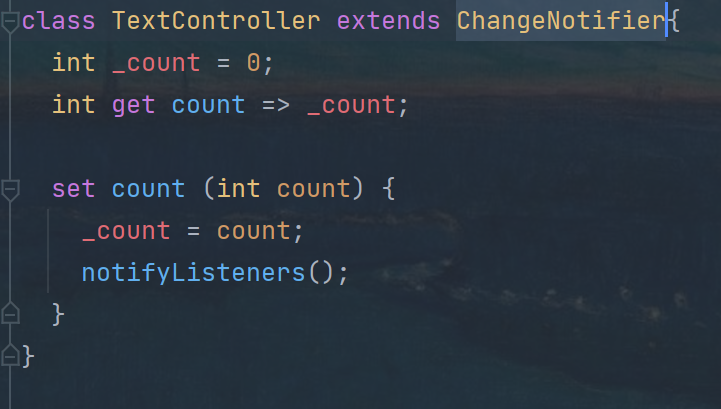
flutter实现封装控制器 在flutter中,尽管已经可以通过状态提升实现小部分的值传递,用回调函数的方法去修改父类的值,在父类调用setstate相当于重新rebuild了父类以及子组件的全部组件,而我们只需要看到子组件的内容发送改变,对此性能上无疑是浪费的。所以需要对组件进行封装,使每次更新只涉及到需要的子组件,这也是性能优化以及解耦的一种解决方案。新建一个controller类继承ChangeNotifier私有化成员变量,设置get set方法,set数据的时候调用notifyListeners函数,通知框架需要更新到新的数据通过ListenableBuilder组件监听需要更新的ChangeNotifier对象每次数据更新使调用set方法都会调用notifyListeners函数,在listenable又会监听到数据的改变,从而进行重绘。